
How To Build A Simple Trading Setup On Your Computer

Many beginners focus only on strategies and ignore the setup behind them. That mistake slows progress and creates confusion during trades.
A clean and simple trading setup can make a huge difference in how you read charts and execute ideas.
You do not need expensive gear or complicated tools to start. You only need the right structure, a stable system, and a few key components that support your decisions.
Once everything sits in the right place, trading becomes easier to manage and far less stressful.
Start With A Reliable Computer And Screen
A slow device can ruin your trading experience. Charts may freeze, orders may lag, and switching between tabs can take too long.
A basic setup works fine if it runs smoothly. You should aim for:
- At least 8GB of RAM
- A stable processor that handles multiple tabs
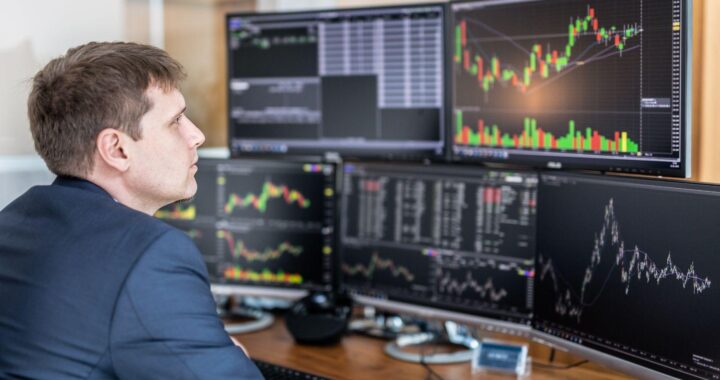
- A clear display with enough screen space
A larger screen helps more than most people expect. You can see price action clearly and avoid constant zooming in and out.
Some traders prefer two monitors. One screen can show charts, while the other displays news or open trades. That setup is helpful, but not required at the start.
Your Platform Matters More Than You Think
Your trading platform acts as your main workspace. Every decision you make goes through it, so it needs to feel smooth and reliable.
Look for a platform that gives you:
- Fast execution without delays
- Clean chart layouts
- Access to indicators and tools
- Easy order placement
Many traders choose platforms that support both manual and automated trading. You can use this platform: https://justmarkets.com/trading-platforms/mt5-pc/
It allows detailed chart analysis, quick trade execution, and support for custom tools. That combination helps you stay flexible as your skills improve.
A good platform should feel natural after a few sessions, not confusing.
Organize Your Charts In A Way That Makes Sense
Random charts create confusion. You need a layout that helps you read the market quickly. Start simple. Focus on one or two pairs and set up charts based on your strategy.
Example layout:
- One chart for entry timing
- One chart for trend direction
- One chart for confirmation
If you trade EUR/USD, you might use:
- 5-minute chart for entries
- 1-hour chart for trend
- Daily chart for overall direction
This structure keeps your analysis clear. You avoid second-guessing because everything sits in front of you.
Keep Your Tools Minimal
Many beginners overload charts with indicators. That usually leads to mixed signals and hesitation.
Stick to a few tools that you understand well. Common choices include:
- Moving averages
- Support and resistance lines
- RSI for momentum
You do not need ten indicators to confirm a trade. Too much information can slow you down.
Example: A simple setup with support levels and one moving average can already help you find solid entry points. Clean charts make decisions faster.
Internet Stability Is Not Optional
A weak connection can cost you money. Orders may fail or execute at the wrong price.
Use a stable internet source whenever possible. A wired connection often works better than Wi-Fi, especially during active trading sessions.
You should also avoid trading during unstable network conditions. Even a short disconnect can affect your trade.
Example: Price moves fast during news events. If your connection drops at that moment, you may not close or adjust your position in time.
Consistency in connection supports consistency in results.
Create A Routine Around Your Setup
Your setup works best when you use it with a routine. Random trading sessions often lead to poor decisions.
Choose a specific time to trade. Many beginners prefer the London or New York sessions because of higher activity.
A simple routine might look like:
- Open charts at the same time each day
- Check key levels before entering trades
- Review open positions at set intervals
A routine builds discipline. You avoid emotional decisions and stick to your plan.
Small Adjustments Make A Big Difference
You do not need a perfect setup on day one. Small improvements over time can change how you trade.
Pay attention to what slows you down. Adjust your layout, remove tools you do not use, and keep only what helps.
Example: If switching between tabs wastes time, place everything on one screen. If charts feel crowded, remove extra indicators.
Your setup should match your style, not someone else’s.
Conclusion
A simple trading setup can improve your focus, speed, and decision-making. You do not need complex tools or expensive equipment to get started.
A stable computer, a reliable platform, and a clean chart layout already put you ahead of many beginners.
Keep everything clear and easy to manage.
Build a routine around your setup and improve it step by step. A strong foundation supports better trades and more consistent progress over time.
Frequently Asked Questions
Do you need two monitors for trading?
No, one monitor is enough to start.
Many traders use a single screen with a clean layout and still perform well. A second monitor can help with multitasking, but it is not required in the early stages.
What is the best time of day to trade?
Many traders focus on the London and New York sessions because of higher volume and clearer price movement.
These sessions often provide better opportunities compared to quieter market hours.
Can you trade on a laptop, or do you need a desktop pc?
A laptop works fine as long as it runs smoothly and handles multiple tabs without lag. Many traders use laptops when they travel or do not have access to a full desktop setup.
How long should a trading session last?
A session can last anywhere from 30 minutes to a few hours, depending on your strategy.
Short sessions work well for active traders, while longer sessions may suit those who analyze multiple setups.
About Author

 Payment for Order Flow
  AI Film maker: Turn One Idea Into a Finished Short Film
  Best Turnkey iGaming Solutions for Operators